Telehealth. Secure. Simple.
Schedule a session, send a code, and consult — with a virtual waiting room, real-time chat, session recording, and tools that work inside the call. No app install.. ever.
Why clinicians choose NeoRehab
A telehealth platform designed by clinicians for clinicians. Telehealth that supports how clinical consultations actually work — not repurposed from business videoconferencing.
Effortless to use
Patients join with an email link or a code — no app, and full calendar integration. Your team is consulting within minutes of signing up.
Built around your workflow
Schedule, invite, consult, record, measure and review — all inside one platform. Waiting room, media sharing, whiteboards and session capture are built in, not bolted on.
Secure by design
Client data is encrypted and secure and meets requirements for medical consultations.
Patients join in seconds. No friction, no frustration.
No app store. No "which link do I click?" phone calls. Patients click a link from their email or enter a code into their browser and they're in a waiting room until you admit them.
Any device
Phone, tablet, or desktop. Just a browser.
Email link or code
No passwords to manage.
Waiting room
Patients wait until you're ready to admit them.

From schedule to session in four steps.
The full consultation lifecycle lives in one place. No third-party calendar plugins, No separate file-sharing or plugin tools.
Schedule
Create a session and add clients from your list.
Invite
The patient gets an email and calendar invitation with a link.
Consult
Run a secure video session with chat, capture, and tools built in.
Review
Session files are saved securly. Replay, annotate, measure or export.
Everything you need, inside the consultation window.
No app-switching, no screen-sharing workarounds. Every capability is accessible from the sidebar during a live session.
Secure video
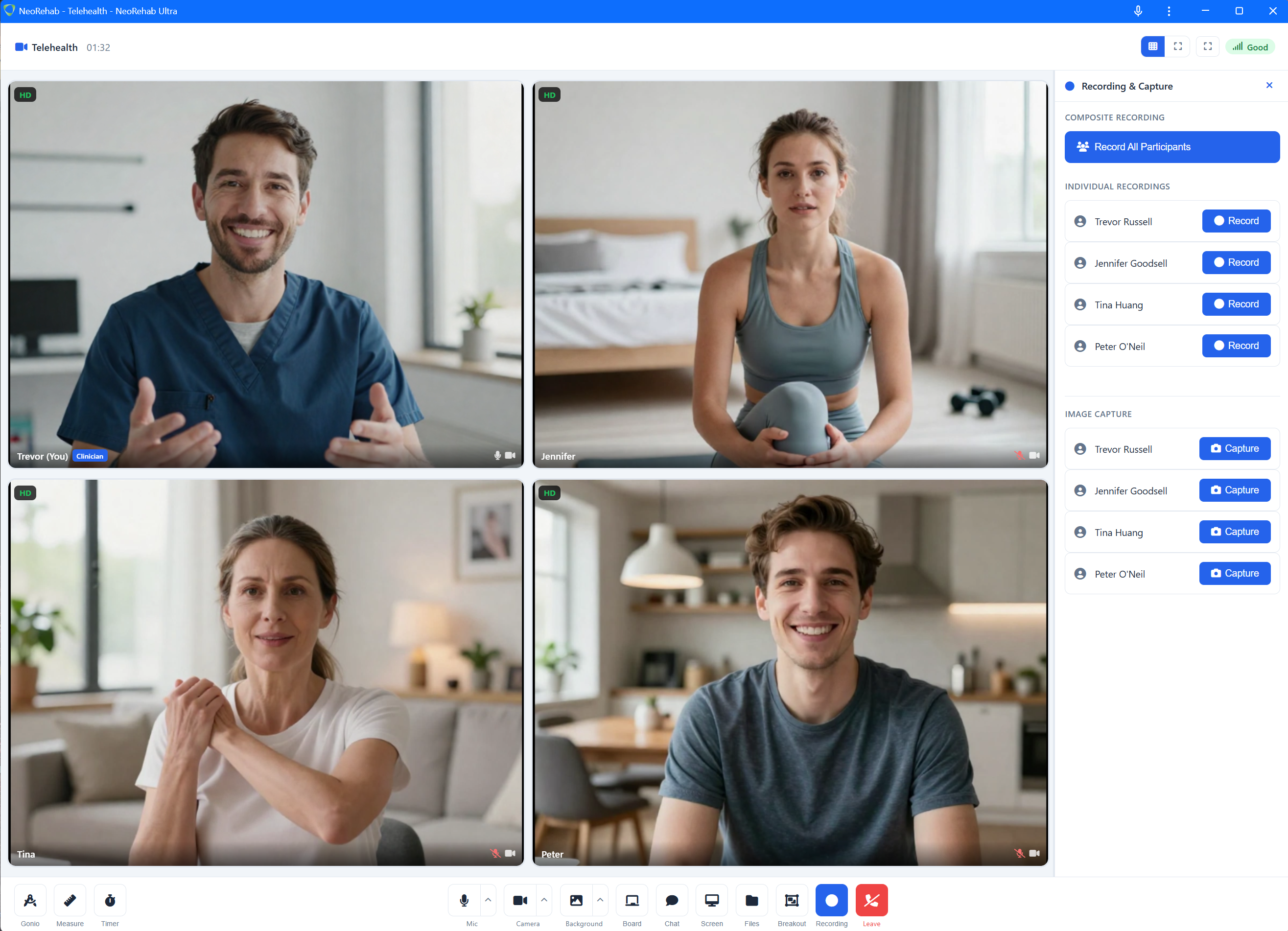
High-quality multi-party video with adaptive quality. Patients are admitted from a virtual waiting room when you're ready.
Session recording
Record individual or combined video feeds directly in the browser.
Still capture
Capture high-resolution screenshots from any video feed mid-session — saved with any annotations or overlays intact.
Media sharing
Share PDFs, images, and videos from your media library directly into the call for patient assessment or interaction.
Whiteboard
Interactive shared canvas. Load a reference image, draw over it, and broadcast to all participants in real time.
Real-time chat
Text chat alongside the video feed. Share links, instructions, or notes without interrupting the spoken conversation.
On-screen measurement and annotation — built into the video call.
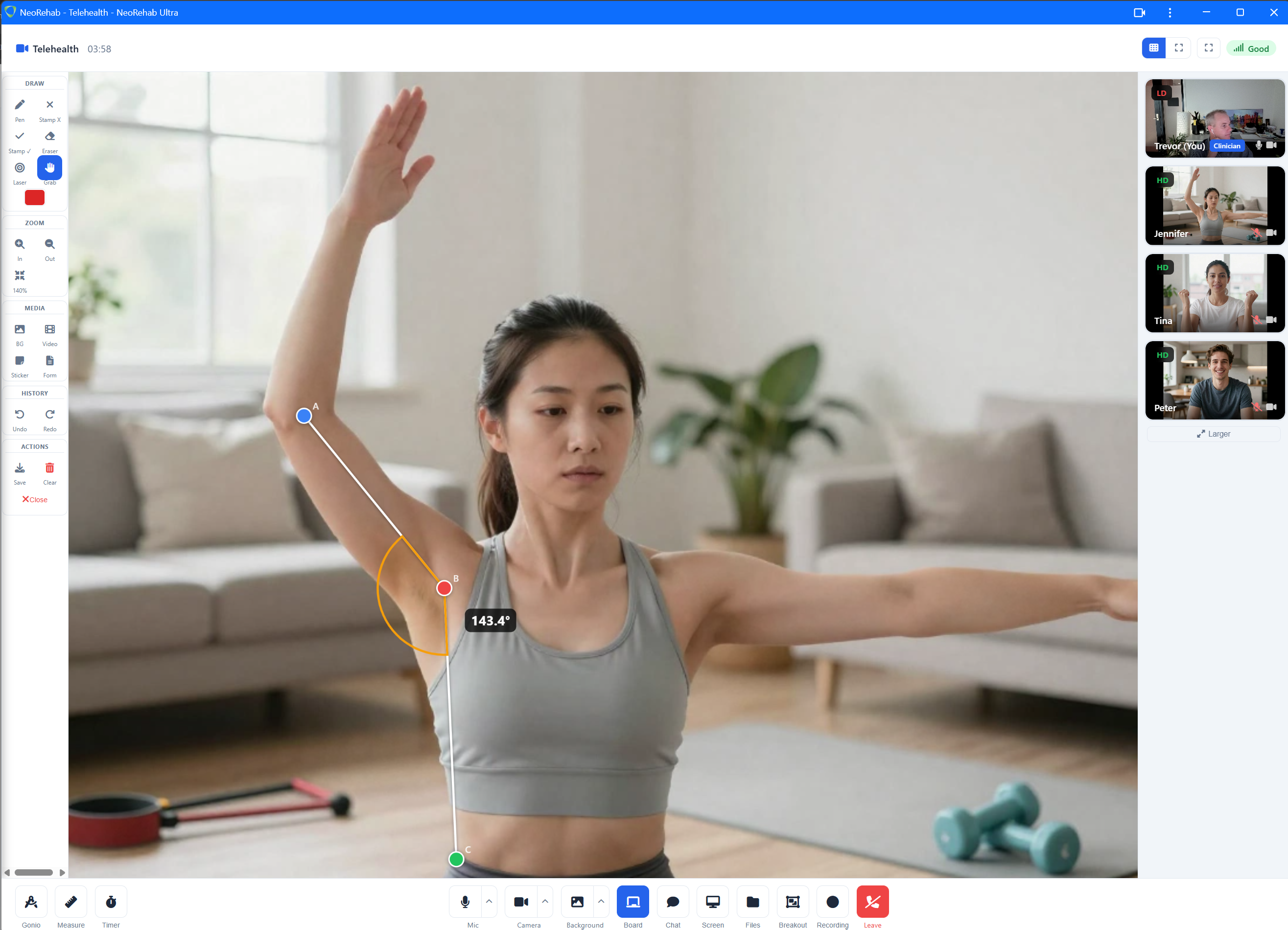
NeoRehab goes beyond standard telehealth with clinical overlay tools that let you assess and explain visually during a live consultation. Readings can be imprinted onto captured images for your records.
Goniometer
Angle measurement overlay. Drag handles to measure and imprint the reading onto a still capture.
Distance ruler
Calibrated two-point distance measurement. Measure on screen and save the result.
Live annotation
Draw directly on the video feed to highlight areas, cue movement, or explain visually. Annotations appear for all participants.
Stopwatch
On-screen timer for timed tasks and assessments. Imprint the result directly onto a still capture for documentation.
After the call — everything is already saved.
Recordings, captures, and shared files are collected automatically during the session. Review them later, or download a complete session package.
Session Viewer
Replay session recordings. Re-apply measurement overlays, annotate still frames, and save annotated copies for your files.
Media library
Organise educational materials, reference images, and documents in folders. Pull them into any session when you need them.
Export packages
Download a complete session with recordings, captures, annotations, and measurement data — ready for your records.
Security that doesn't get in the way.
NeoRehab is built for clinical data from the ground up — not retrofitted with a security layer as an afterthought.
What you get vs. what you're used to.
Generic video tools
- Patients need accounts and app downloads
- No waiting room or admit flow
- Switching apps to share files or explain
- Screenshots as "documentation"
- No clinical overlay tools
NeoRehab
- Patients join with a link or code in their browser
- Virtual waiting room with clinician admit control
- Share media, annotate, and whiteboard inside the call
- Record, capture stills, and export session packages
- Measure and annotation overlays on video
One plan. Full access. No surprises.
No feature gates, no per-minute charges, no add-on pricing. Every practitioner gets every tool, every time.
- Unlimited telehealth sessions
- Virtual waiting room
- Session recording and still capture
- Whiteboard, chat, and media sharing
- Media library with secure cloud storage
- Clinical tools (goniometer, ruler, annotation)
- Session Viewer with post-session review
- Patient access via link or code
"I used to spend the first 10 minutes troubleshooting links and microphones. Now my patients join straight away and we can focus on treatment."— Physiotherapist, Regional Clinic
"The waiting room and instant file sharing have made telehealth feel organised and professional. It’s the first platform our whole team actually enjoys using."— Allied Health Practice Manager
"My patients love that they don’t need to install anything. They click the link, and we’re in session within seconds."— Occupational Therapist
Not sure if your setup will work?
Run a quick device test before your first session. The wizard checks your camera, microphone, speakers, and network connectivity — all in your browser, nothing recorded.
Telehealth that works the way you work.
Secure video, patient-friendly joining and clinical tools when you need them.